Getting Started
Complete integration guide for the Enhanced Webhook Proxy with Roblox games and other applications.
Quick Start
Get up and running with the Enhanced Webhook Proxy in just a few simple steps. This guide will walk you through the complete integration process.
Custom Discord webhooks:
Any Discord webhook works. Replace discord.com with
webhook.newstargeted.com in the URL and POST the same payload.
The RBX-Tracker bot is not required to send. Register the webhook in the dashboard
and keep an active plan only if you need higher ingress limits during busy periods.
Create Webhook
Create a Discord webhook in your server settings
Convert URL
Use our URL converter to get the proxy URL
Integrate
Use the proxy URL in Roblox, Discord bots, or any HTTP client
Step 1: Create a Discord Webhook
1.1 Navigate to Server Settings
In your Discord server, go to Server Settings → Integrations → Webhooks
You need "Manage Webhooks" permission to create webhooks
1.2 Create New Webhook
Click "New Webhook" and configure the following:
- • Name: Choose a descriptive name (e.g., "Game Notifications")
- • Channel: Select the channel where messages will be sent
- • Avatar: Optional custom avatar for the webhook
1.3 Copy Webhook URL
After creating the webhook, click "Copy Webhook URL". The URL will look like this:
Step 2: Convert to Proxy URL
2.1 Use URL Converter
Go to our homepage and use the URL Converter tool, or manually replace the domain:
Original Discord URL:
Enhanced Proxy URL:
2.2 Queue System (Recommended)
For reliable message delivery, use the queue endpoint:
The queue system provides automatic retry logic and Discord rate-limit handling. Messages are queued and retried; delivery is eventually consistent, not instant under heavy load. Validate payloads before sending (invalid messages may fail permanently).
- • Soft ingress: ~10 POST/min per webhook before slowdown on
/queue - • Discord outbound pacing: ~25–30 messages/min per webhook
- • Extreme volume may receive HTTP 429; very large queue backlogs may receive HTTP 503
Step 3: Roblox Integration
3.1 Basic HTTP Request
Use Roblox's HttpService to send webhook messages:
local webhookUrl = "./api/webhooks/YOUR_ID/YOUR_TOKEN"
local data = {
content = "Hello from Roblox!"
}
local success, response = pcall(function()
return HttpService:PostAsync(webhookUrl, HttpService:JSONEncode(data))
end)
if success then
print("Webhook sent successfully!")
else
warn("Failed to send webhook:", response)
end
3.2 Advanced WebhookService Module
For the best experience, use our enhanced WebhookService module:
local webhook = WebhookService:new("YOUR_ID", "YOUR_TOKEN")
-- Send a simple message
webhook:Queue({
content = "Player joined the game!"
})
-- Send an embed
webhook:Queue({
embeds = {{
title = "Game Event",
description = "Something exciting happened!",
color = 0x00ff00
}}
})
Step 4: Discord-to-Roblox Proxy
The Enhanced Webhook Proxy now supports bidirectional communication! Forward Discord webhook interactions and messages directly to your Roblox game's HTTP Service endpoints.
4.1 What is Discord-to-Roblox Proxy?
The Discord-to-Roblox proxy allows you to send HTTP requests from Discord webhooks and interactions directly to your Roblox game's HTTP Service endpoints. This enables two-way communication between Discord and your game.
This feature complements the existing Roblox-to-Discord webhook proxy, creating a complete bidirectional communication system.
4.2 Register Your Game Endpoint
First, register your Roblox game's HTTP Service endpoint in the Dashboard:
- Navigate to Dashboard → Roblox Proxy section
- Enter your Roblox Game ID (numeric)
- Provide your game's HTTP Service base URL (must be HTTPS)
- Optionally add an API key for authentication
- Optionally link a Discord webhook ID for access control
- Click "Register Game Endpoint"
4.3 Proxy Request Format
Use the following URL pattern to forward Discord requests to your Roblox game:
Example:
Content-Type: application/json
X-Discord-Webhook-ID: 987654321012345678
{
"action": "player_join",
"player_id": "Player123",
"discord_user": {
"id": "111222333",
"username": "DiscordUser"
}
}
4.4 Supported HTTP Methods
All standard HTTP methods are supported:
- • GET - Retrieve data from your game
- • POST - Submit data to your game
- • PUT - Update data in your game
- • PATCH - Partially update data
- • DELETE - Delete data from your game
4.5 Request Transformation
The proxy automatically adds Discord metadata to your requests, including:
- • Discord webhook ID and token
- • Channel and guild IDs
- • User information (if available)
- • Timestamp of the request
This metadata is automatically included in the request payload sent to your Roblox game endpoint.
4.6 Use Cases
Discord Slash Commands
Execute game actions directly from Discord slash commands, triggering in-game events or retrieving player data.
Bot Interactions
Allow Discord bots to interact with your game, such as giving items, checking stats, or managing players.
Webhook Events
Forward webhook events from other services to your game, enabling cross-platform integrations.
Real-time Sync
Keep game state synchronized with Discord, such as updating roles based on in-game ranks.
4.7 Security & Rate Limiting
- • Rate limiting: soft limit ~10 POST requests per minute per game and IP (additional requests are delayed, not dropped immediately)
- • Optional API key authentication for your endpoints
- • Optional webhook ID-based access control
- • Path traversal protection
- • HTTPS-only endpoint URLs
Important: Always validate and sanitize incoming requests in your Roblox game code. Never trust external input without verification.
4.8 Dashboard Management
Manage your registered game endpoints from the Dashboard:
- • View all registered games and their status
- • Enable/disable endpoints without deletion
- • Update endpoint URLs and API keys
- • Monitor request statistics
Download WebhookService Module
Get the complete, production-ready WebhookService module with advanced features, error handling, and queue management.
WebhookService.lua
v2.2.0 • 741 lines • Production Ready
Free download • No registration required
Roblox Studio Setup
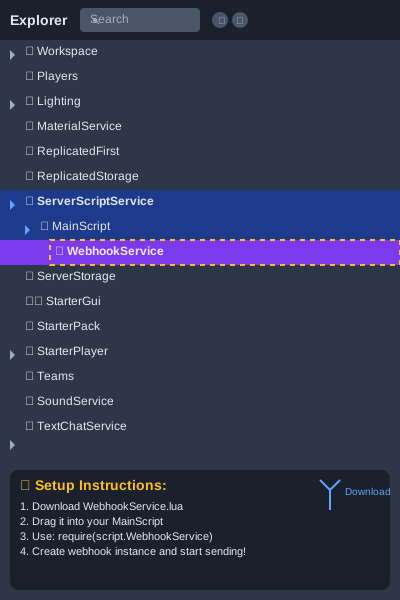
Quick Setup: Download the file, drag it into your MainScript in ServerScriptService, then require it with require(script.WebhookService)
Higher Limits
Need more webhook ingress throughput? Subscribe on Subscribe (Free, Basic, Premium, or Enterprise) via PayPal, Patreon, or Discord Store subscription.
After you log in here and add your webhook in the
Dashboard,
your active RBX Stats plan raises ingress limits for registered webhooks on this proxy. Sending still works without RBX-Tracker: only the rewritten webhook URL is required.
Discord Store subscriptions activate automatically; PayPal and Patreon use /redeem in the RBX Stats Discord server.
Best Practices
Security
- • Never expose webhook tokens in client-side code
- • Use server-side scripts for webhook calls
- • For high-volume games, throttle sends in your game;
/queuehandles Discord-side pacing for normal use - • Validate all data before sending
Performance
- • Use the queue system for reliable delivery
- • Batch multiple messages when possible
- • Use
/queueso the proxy handles retries; still handle HTTP 429/503 in your game - • Monitor webhook response times
Code Quality
- • Use descriptive webhook names
- • Structure your embeds properly
- • Handle all possible error cases
- • Log important events for debugging
User Experience
- • Send relevant and timely notifications
- • Use embeds for better presentation
- • Include useful information in messages
- • Respect Discord rate limits
Troubleshooting
Common Issues
"HttpService is not enabled"
Enable HttpService in Game Settings → Security
"429 Rate Limited"
Direct POST: slow down or switch to /queue. Queue 429 ingress_webhook_limit: you exceeded per-webhook ingress; wait for Retry-After.
"Invalid webhook URL"
Check your webhook ID and token are correct